
Why You Should Delete Image EXIF Data
Every photo you take with your phone or camera can include hidden metadata called EXIF (Exchangeable Image File Format) data. This can include your device make and model, the exact date and time the photo was taken, and—most concerning—your GPS location.
What is EXIF data?
EXIF data is automatically embedded in image files by digital cameras and smartphones. It can store technical details (like exposure, ISO, and lens), but it may also include personal information such as:
- Your device model (and sometimes identifiers)
- The time and date the photo was taken
- Precise latitude/longitude coordinates

Why should you delete EXIF data?
Here are the most common reasons to remove metadata before sharing images publicly:
- Protect your privacy: EXIF can reveal where you live, work, or frequently visit. If you post images publicly, location data can increase risks like stalking, burglary, or doxxing.
- Prevent unwanted tracking: Some sites strip metadata, but not all do. If someone downloads your image, they can extract remaining EXIF with free tools.
- Professionalism: Journalists, photographers, and businesses often remove EXIF to avoid leaking sensitive information or workflow details.
- Reduce file size (slightly): Removing metadata can shave off a small amount of extra data.
How to view and remove EXIF data
You can view EXIF data using built-in tools on your computer, or with dedicated viewers. To remove it, you can use:
- ExifEditor.io (browser-based; runs locally in your browser)
- ExifTool (powerful command-line tool)
- Platform-specific apps (varies by OS)
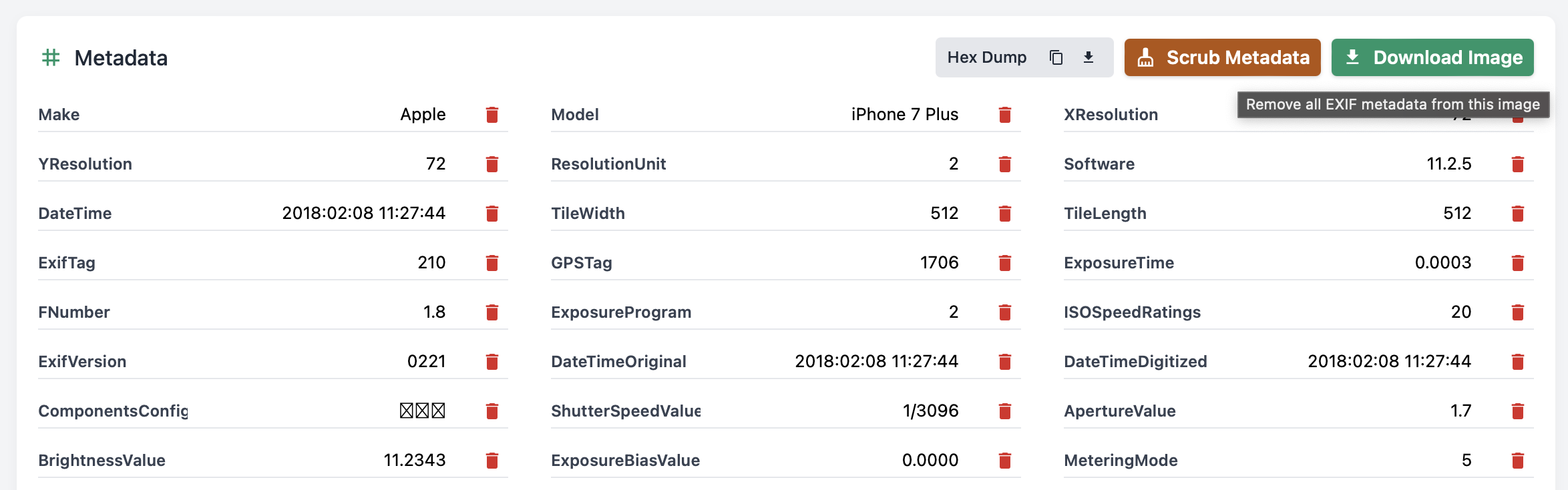
Quick steps: remove EXIF data with ExifEditor.io
- Open
https://exifeditor.io/ - Drag-and-drop your image into the tool
- Review the metadata, then choose to scrub/remove fields
- Download your cleaned image
Should you always delete EXIF data?
Not always. Metadata can be useful for your personal archive or for copyright/attribution workflows.
But before sharing photos publicly (social media, forums, marketplaces, or sending to strangers), it’s usually safest to remove location and identifying information.
Conclusion
EXIF data is useful—but it can also be a privacy risk. If you share photos online, take a moment to check what your images contain and remove what you don’t want to publish.
Try ExifEditor.io to view and remove metadata safely in your browser.
Keep Exploring EXIFEditor.io
Use the main editor to inspect or clean photo metadata, then continue with the guides, FAQ, and quiz to learn more.