
Photo Location Finder: Find Where a Photo Was Taken With EXIF GPS
How to Find Where a Photo Was Taken Using EXIF GPS Data
Ever wondered where a photo was taken? Whether you’re retracing your travels, verifying an image, or organizing your photo library, finding the exact location of a photo is easier than you think.
With the Photo Location Finder from EXIFEditor.io, you can extract GPS coordinates from your images and instantly map them—no technical knowledge required.
What Is a Photo Location Finder?
A photo location finder is a tool that reads EXIF metadata embedded in image files. Many photos taken on smartphones and cameras include hidden GPS data such as:
- Latitude & longitude
- Date and time taken
- Device information
Our tool automatically extracts this data and visualizes it on an interactive map.
Key Features
📍 Instant GPS Extraction
Upload your images and instantly detect embedded location data.
🗺️ Interactive Map View
See exactly where each photo was taken plotted on a live map.
🧭 Route Mapping
Visualize movement between photos to recreate journeys and timelines.
🖼️ Batch Upload Support
Upload multiple photos at once and map them together.
⏱️ Timeline Playback
Animate your photos chronologically to relive trips step by step.
🔍 Metadata-Only Mode
Quickly check if a photo contains GPS data without full mapping.
Why Use EXIFEditor.io’s Photo Location Finder?
- Free and easy to use
- No account required
- Works directly in your browser
- Supports multiple images
- Privacy-friendly (files are not permanently stored)
How to Find Where a Photo Was Taken
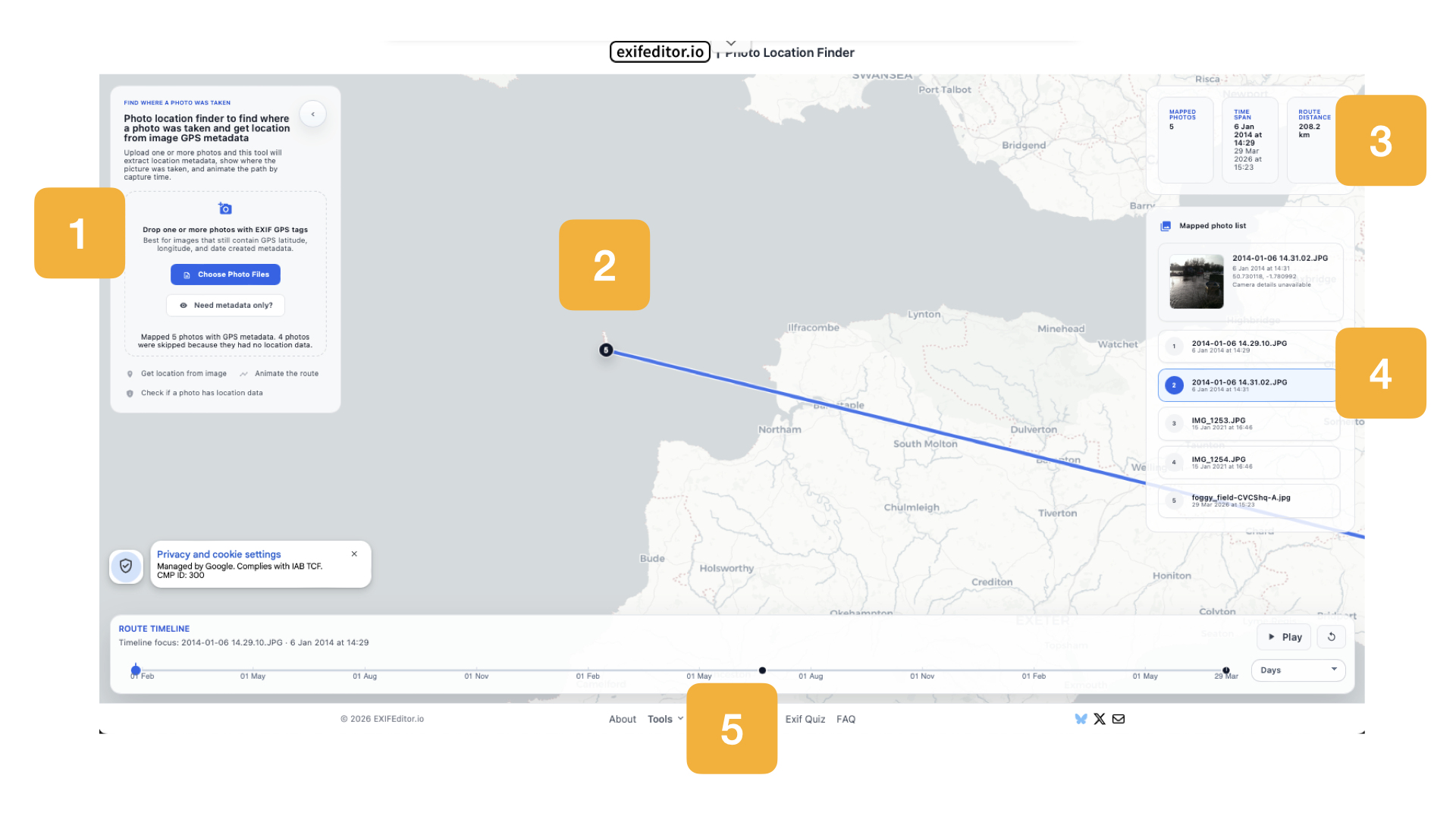
Follow these simple steps:
1. Upload Your Photos
Drag and drop your images or click “Choose Photo Files” to upload photos that contain EXIF GPS data.
2. View Locations on the Map
Once uploaded, the tool automatically extracts coordinates and places markers on the map showing where each photo was taken.
3. See Summary Insights
Get a quick overview including:
- Number of mapped photos
- Time span of your images
- Total distance covered
4. Browse Your Photo List
Select individual photos from the list to:
- Highlight their location
- View timestamps
- Inspect available metadata
5. Explore the Timeline
Use the timeline slider to:
- Navigate through your photos chronologically
- Play an animated route of your journey
Use Cases
Travel Tracking
Relive your trips and visualize your route across cities and countries.
Photo Verification
Check where an image was taken for authenticity or research.
Photo Organization
Sort and group images by location for better archive management.
Storytelling
Create visual journeys and timelines from your photos.
Does Every Photo Have Location Data?
Not always. GPS data is only available if:
- Location services were enabled on your device
- The camera supports geotagging
If a photo doesn’t contain location data, the tool will let you know instantly.
Try the Photo Location Finder Now
Ready to discover where your photos were taken?
Visit: https://exifeditor.io/photo-location-finder
Upload your images and map your memories in seconds.
FAQ
Can I find the location from any image?
Only images with embedded EXIF GPS metadata will work.
Is this tool free?
Yes, it’s completely free to use.
Are my photos stored?
No—your files are processed in-browser and not permanently stored.
Keep Exploring EXIFEditor.io
Use the main editor to inspect or clean photo metadata, then continue with the guides, FAQ, and quiz to learn more.